
01
Manual Intake
Counsellors needed to understand incoming cases before deciding the appropriate next step.

Product & UX/UI case study
Website Sticky Chat Widget and Counsellor CMS Platform
Designing a Coordinated Path from First Contact to Human Support
Available on
01
Project snapshot
02
Overview
OpenUp is a 24/7 online text-based emotional-support service designed mainly for young people in Hong Kong.
The digital product connects a help-seeker chat experience with a counsellor-facing CMS, supporting live conversations, case visibility, service coordination and follow-up across multiple communication channels.
Visit OpenUp03
The challenge
The service depended heavily on counsellors manually reviewing incoming conversations before understanding each help seeker’s situation and support needs.
The design challenge was to improve intake and case management while preserving privacy, sensitivity and human judgement.
Counsellors needed to understand incoming cases before deciding the appropriate next step.
On-duty teams needed a clearer overview of waiting cases, active conversations and counsellor availability.
Potentially urgent cases required visible indicators and human review.
04
My role & process
I translated service and workflow requirements into a connected help-seeker and counsellor experience.
My design scope covered the website chat widget, counsellor CMS, system flows, interface design and interactive prototypes.
Service and Workflow Analysis + System Flow Design + UX/UI Design + Prototyping
Evidence note: This case study presents workflow analysis, service flows and interface artefacts. It does not include participant counts, formal study findings, usability-test results or service-performance metrics.
Zensis has supported the platform as a development partner since 2018.
05
Connected service flow
The experience connects initial contact, case understanding, counsellor review and ongoing support within one coordinated workflow.
The connected service flow moves from a help seeker through the website chat widget, initial context, queue and priority indicator, human counsellor review, the CMS workspace, and support, referral or follow-up.
06
Help-seeker chat widget
The sticky chat widget provides a clear first point of contact for people seeking support.
The proposed pre-chat flow helps collect essential context and prepare a priority indicator for counsellor review, while the support conversation remains with a trained person.
The chat flow moves from starting chat and accepting terms through availability, queue or appointment, essential context collection, human counsellor review and a human-supported conversation.
07
Counsellor CMS
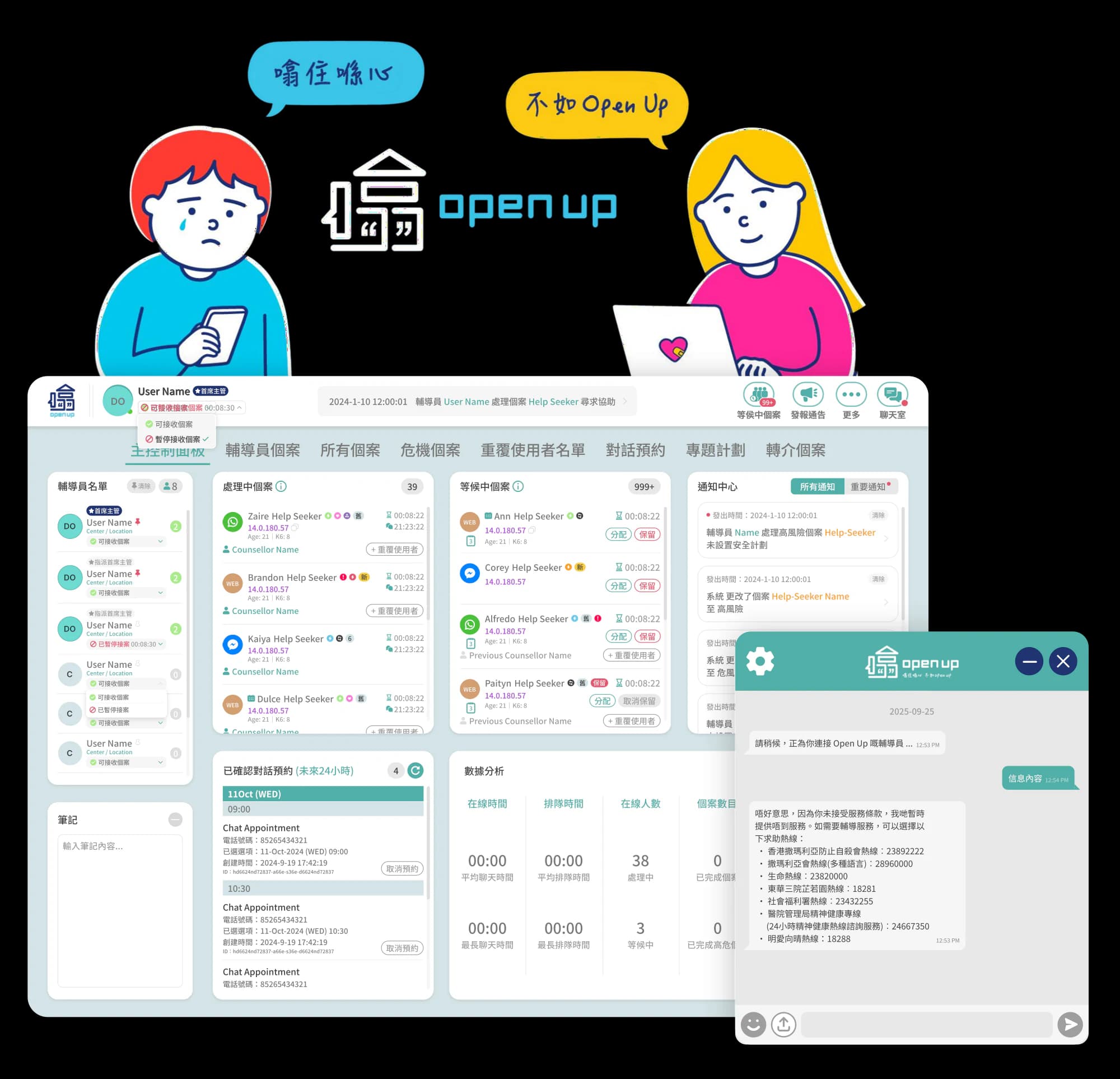
The CMS gives counsellors and supervisors a clearer view of waiting, scheduled and ongoing cases while keeping conversation context and case actions within one workspace.
It also supports multiple conversations, referral and follow-up without losing the status of each case.
Monitor
Understand
Support
Collaborate
The counsellor CMS is organised around four groups: monitor appointments, queues and ongoing cases; understand case profiles, conversation history and priority indicators; support live conversations, notes and follow-up; and collaborate through referrals, external professionals and supervisor review.
08
Design output & reflection
Design output
The proposed experience connects initial contact, case understanding and counsellor support within one coordinated service flow.
The chat widget is designed to collect essential context before handover, while the CMS places waiting, active and ongoing cases in a shared operational view.
Reflection
The key challenge was not simply introducing AI into the workflow, but defining where technology could assist and where human judgement needed to remain visible and in control.